Actions
Documentation #8358
closed
RS
SS
Wrong file path for suricata.yaml in the Quick Start guide
Documentation #8358:
Wrong file path for suricata.yaml in the Quick Start guide
Affected Versions:
Effort:
low
Difficulty:
Label:
Description
Wrong file path for suricata.yaml in the Quick Start guide > Basic Setup
https://docs.suricata.io/en/latest/quickstart.html#basic-setup
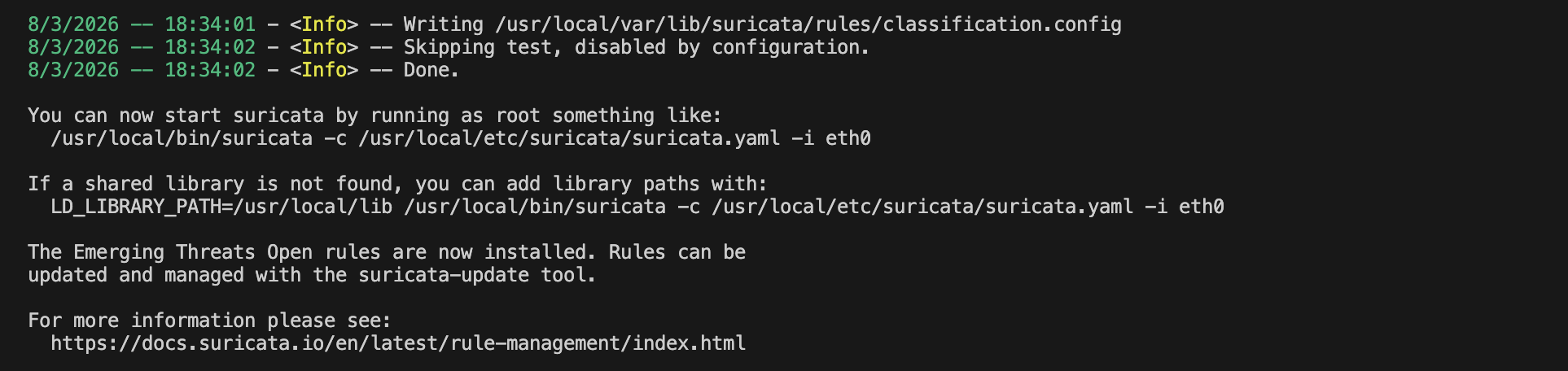
The path mentioned in the guide: `/etc/suricata/suricata.yaml`
Seems it was changed. Path that is shown in the terminal while executing the command `./configure && make && make install-full`
`/usr/local/etc/suricata/suricata.yaml`
Files
RS Updated by Roopesh Saravanan 8 months ago
- Status changed from In Progress to New
SS Updated by Samaresh Kumar singh 4 months ago
- Assignee set to Samaresh Kumar singh
PA Updated by Philippe Antoine 4 months ago
- Status changed from New to In Review
PA Updated by Philippe Antoine 3 months ago
- Status changed from In Review to Closed
- Target version changed from TBD to 9.0.0-beta1
Actions